Picture reaching learners in ten countries without filming one new video. That happens when you localize course content with the right AI tool. Instead of recreating every lesson from scratch, you can adapt your existing content for different languages and audiences in just a few steps. Vidnoz AI makes this possible for free.
Vidnoz AI is a free AI-powered video creation platform built for creators and teams everywhere. It holds ISO/IEC 27001:2022 certification for Information Security Management. Your scripts, footage, and course data stay protected during every project.
Global classrooms move fast today. Learners expect lessons in their own language and tone. When you localize course content with smart AI tools, you save weeks of editing and reach far more students. This guide breaks down why Vidnoz AI stands out and how to use it step by step.
Why Localization Matters for Global Learners
Learners retain more when a lesson speaks their own language. A course dubbed in the wrong tone can lose attention fast. Engagement drops within minutes when learners struggle to follow along.
Teams that localize course content early see faster onboarding and fewer repeated questions. Sales teams close deals sooner when a product demo speaks the buyer’s own language too.
Vidnoz AI already supports training videos, onboarding lessons, and full online courses for teams worldwide. So instead of starting from scratch for every market, you can quickly adapt your existing course content for different audiences and languages. What used to be a slow, expensive process can become a same-day task for almost any subject.
Key Features That Help You Localize Course Content
Vidnoz AI packs several powerful tools into one simple platform. Each feature makes it easier to localize course content for any subject or audience, no editing skills required. Here is what makes the platform stand out for global course creators.
1900+ Lifelike Avatars for Every Industry
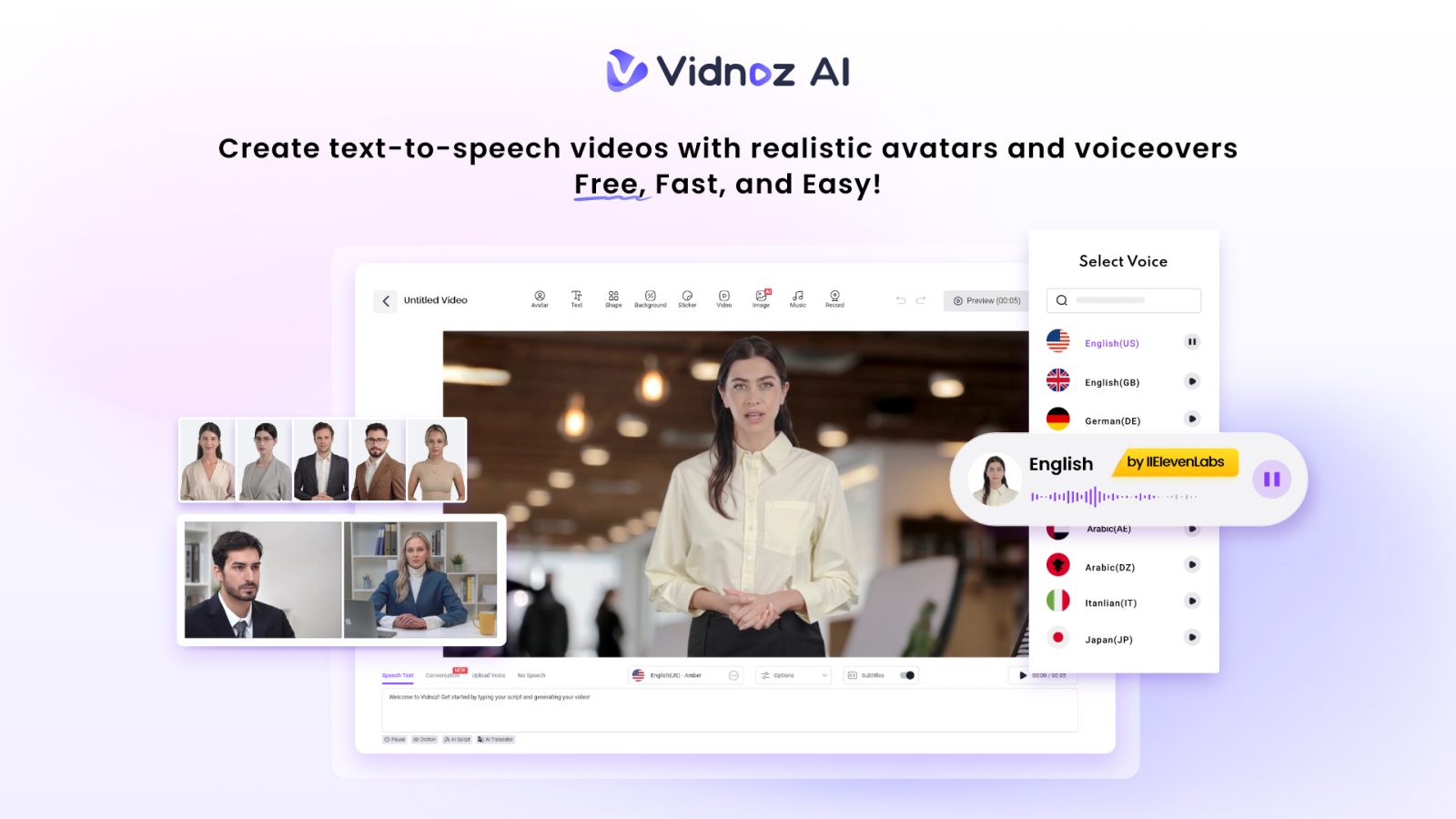
Vidnoz AI offers over 1900 lifelike avatars pulled from many industries and roles. Business, healthcare, tech, and education are all represented well. You can match an avatar to your course topic within seconds.
There is always an existing or customizable avatar for your context, including:
- Your digital twin for personal branding
- Expressive avatars for emotional storytelling
- Product avatars for demos and walkthroughs
Every avatar can be adjusted so lessons feel native to each region you target.
2000+ Lip Sync AI Voices in 140+ Languages
Voice quality shapes how learners connect with a lesson. Vidnoz AI provides 2000+ natural-sounding AI voices across 140+ languages. Pronunciation stays clear even in complex technical topics.
These voices run on ElevenLabs, Microsoft and Google technology. That blend delivers natural pacing and tone for classrooms around the world. Swapping a voice takes seconds, not hours of studio recording or hiring new talent.
2800+ Pre-Designed Video Templates
Starting a lesson from a blank screen slows teams down badly. Vidnoz AI includes 2800+ pre-designed video templates for tutorials, onboarding and full courses. Pick a layout that fits your subject and drop your script inside.
Formatting, transitions and pacing are already built for you. Your course becomes ready for translation within minutes instead of days, even for large curriculums. Templates cover training, onboarding, explainer and support lessons alike.
Free Daily Use for Every Learner Creator
Every user gets 30 credits of free video generation per day. Teams can test avatars, voices, and templates before choosing a paid plan. This makes it simple to trial localization on a real lesson first, with zero upfront cost. Upgrading later unlocks longer videos for full course catalogs.
How to Use Vidnoz AI to Localize Course Content Fast
Turning one lesson into several languages takes just four simple steps. Go to the Vidnoz AI video generator official website.
Step 1: Choose a Template and Avatar
Browse the template library and pick one suited to your subject. Select an avatar that represents your brand, instructor, or product. This sets the visual tone for your localized course.
Step 2: Create AI Voiceover
Paste your lesson script into the editor. Choose a voice from over 2000 options and pick the target language. Learners hear natural pronunciation instead of robotic playback.
Step 3: Add Custom Touch
Insert your logo, brand colors, captions and background music. Small touches help each localized version feel built for that specific audience rather than translated on the fly.
Step 4: Generate AI Video and Share
Click Generate and let Vidnoz AI render the finished course. Download the file or share a link directly with learners anywhere in the world. Repeat the process for each new language you need.
Conclusion: Start to Localize Course Content Today
Reaching a global classroom no longer requires a full production crew. With Vidnoz AI, you can localize course content fast, safely, and without extra cost.
From lifelike avatars to natural voices in 140+ languages, every tool here supports your global teaching goals. Sign up, choose a template, and turn one lesson into a course learners anywhere can understand.
There is no need to wait for your next course launch or hire a translation agency. Every avatar, voice and template works together to save your team real time. Try Vidnoz AI now and give every learner a lesson that feels made just for them.